CreatorKit Review (2026): AI Video Editor Pricing, Limits & Alternatives
Bottom line
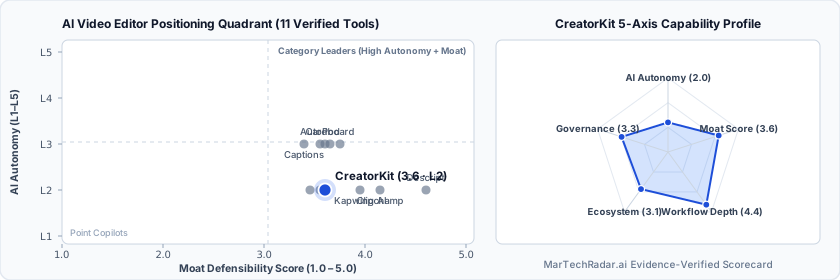
CreatorKit is a Web SaaS tool for AI Video Editor (AI Video Repurposing & Shorts Editing) in Visual & Creative Media. Pricing: Free plan · $0/mo · Enterprise plan. Best suited to DTC / eCommerce. Editor ratings: AI autonomy L2 (workflow copilot); moat score 3.6/5.0 (Proprietary moat). Fact-checked by Anthony Hay on Oct 16, 2026.
AI-powered creative automation platform enabling direct-to-consumer brands to generate synthetic actor ads, lipsync video variations, and cloned product.
CreatorKit buyer fit verdict: when to choose vs. when to walk away
Choose CreatorKit if (Best Fit)
- Target ICP & Stack Fit: You operate as DTC / eCommerce requiring a Web SaaS deployment for AI Video Editor.
- L2 Architecture & Defensibility: Moat rests primarily on its high-throughput lipsync and synthetic actor pipeline tuned specifically for direct-to-consumer ad creative workflows, augmented by direct ecommerce catalog connectors.
- Commercial Model Fit: Your procurement budget aligns with Free plan · $0/mo · Enterprise plan and want a self-serve free tier for zero-cost initial validation.
Walk away from CreatorKit if (Deal-Breakers)
- Walk away if your workflow requires uncapped enterprise volume on the Free plan · $0/mo · Enterprise plan entry plan without upgrading tiers.
- Walk away if your workflow cannot tolerate rendering artifacts in dynamic scenes: Users encounter operational friction and integration bottlenecks, as the pipeline struggles with The lipsync model can introduce unnatural warping around jawlines when applied to source footage containing rapid head movements or complex dynamic lighting.
- Walk away if ecosystem platform dependencies is a deal-breaker for your team: Users encounter operational friction and integration bottlenecks, as the pipeline struggles with Asset ingestion relies heavily on standard catalog schemas, requiring manual formatting when importing data from bespoke or headless ecommerce stacks.
CreatorKit key facts & scorecard
| Pricing | Free plan · $0/mo · Enterprise planVendor pricing page |
|---|---|
| Free plan | Yes |
| Delivery | Web SaaS |
| Audience | DTC / eCommerce |
| AI autonomy level | L2 · Workflow copilotEditor-verified |
| Moat tier & score | 3.6 / 5.0 · Proprietary moatEditor-verified |
| Funding | Seed |
| Company size | 11-50 employees |
| Governance & docs | Terms ↗ · Privacy ↗ |
| Headquarters | Walnut, California |
| Founded | 2017 |
| Last verified |
CreatorKit pros & cons: strengths vs. operational limitations
Pros: core strengths & capabilities
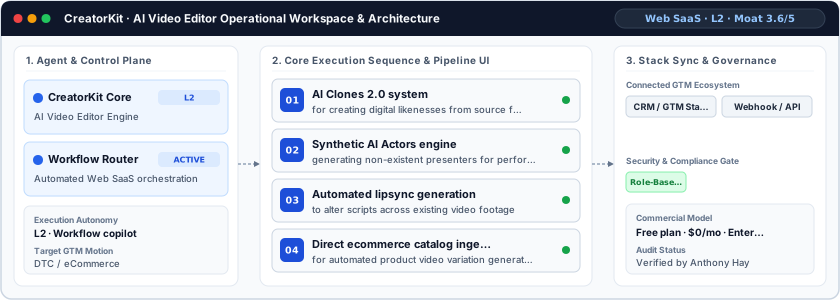
- AI Clones 2.0 system: for creating digital likenesses from source footage
- Synthetic AI Actors engine: generating non-existent presenters for performance video ads
- Automated lipsync generation: to alter scripts across existing video footage
- Direct ecommerce catalog ingestion: for automated product video variation generation
Cons: operational limitations & risks
- Rendering Artifacts in Dynamic Scenes: Users encounter operational friction and integration bottlenecks, as the pipeline struggles with The lipsync model can introduce unnatural warping around jawlines when applied to source footage containing rapid head movements or complex dynamic lighting.
- Ecosystem Platform Dependencies: Users encounter operational friction and integration bottlenecks, as the pipeline struggles with Asset ingestion relies heavily on standard catalog schemas, requiring manual formatting when importing data from bespoke or headless ecommerce stacks.
- Brand Governance Constraints: Users encounter operational friction and integration bottlenecks, as the pipeline struggles with Synthetic actors lack custom keyframe-level animation controls, restricting enterprise creative directors who mandate rigid adherence to granular brand style guidelines.
CreatorKit TCO & deal-breaker stress test
Simulate 12-month stepped TCO, hidden cost multipliers, contract lock-in exposure, and stack failure modes using only facts verified by Anthony Hay on · Capture SHA dbbadb6c.
CreatorKit is viable for 5 seats, but requires commercial or technical verification on the flagged items below.
| Plan / Tier | Verified Rate | Scale Fit | Scope & Quota Notes |
|---|---|---|---|
| Free / Sandbox | $0 | 1–2 seats (Evaluation) | Entry free tier with capped usage or feature quotas for initial workflow testing. |
| Pro | $32/mo | 1–2 seats | Verified $32/mo tier from vendor pricing schedule. |
| Unlimited | $82/mo | 5 seats | Verified $82/mo tier from vendor pricing schedule. |
| Unlimited | $115/mo | 15 seats | Verified $115/mo tier from vendor pricing schedule. |
- Moat Score
- 3.6 / 5.0
- AI Autonomy
- L2
- Free Tier / Trial
- Free plan
Triggered audit signals & failure modes
- Opaque Enterprise Quoting vs. SMB/Mid-Market BudgetVerified Pricing Ledger
CreatorKit does not disclose a public self-serve floor (Free plan · $0/mo · Enterprise plan). Buyers with a $800/mo cap face high sales-qualification friction.
- Published Self-Serve Entry FloorVerified Pricing Ledger
CreatorKit publishes a transparent entry point (Free plan · $0/mo · Enterprise plan) with a free tier for initial validation before committing.
- Tier Fit for 5-Seat Scale: Pro ($32/mo)Verified Tier Schedule
Verified $32/mo tier from vendor pricing schedule.
- Primary Operational Bottleneck: Rendering Artifacts in Dynamic ScenesAudit by Anthony Hay
Users encounter operational friction and integration bottlenecks, as the pipeline struggles with The lipsync model can introduce unnatural warping around jawlines when applied to source footage containing rapid head movements or complex dynamic lighting.
Hidden TCO Multipliers & Quota Gates
- Credit & Usage Burn Multiplier: Automated workflows consume metered credits/usage quotas; multi-step enrichment, voice minutes, or high-frequency agent runs can trigger mid-cycle top-up packs.
- Rendering Artifacts in Dynamic Scenes: Users encounter operational friction and integration bottlenecks, as the pipeline struggles with The lipsync model can introduce unnatural warping around jawlines when applied to source footage containing rapid head movements or complex dynamic lighting.
- Ecosystem Platform Dependencies: Users encounter operational friction and integration bottlenecks, as the pipeline struggles with Asset ingestion relies heavily on standard catalog schemas, requiring manual formatting when importing data from bespoke or headless ecommerce stacks.
When to Walk Away & Negotiation Levers
- Walk away if your workflow requires uncapped enterprise volume on the Free plan · $0/mo · Enterprise plan entry plan without upgrading tiers.
- Walk away if your workflow cannot tolerate rendering artifacts in dynamic scenes: Users encounter operational friction and integration bottlenecks, as the pipeline struggles with The lipsync model can introduce unnatural warping around jawlines when applied to source footage containing rapid head movements or complex dynamic lighting.
- Walk away if ecosystem platform dependencies is a deal-breaker for your team: Users encounter operational friction and integration bottlenecks, as the pipeline struggles with Asset ingestion relies heavily on standard catalog schemas, requiring manual formatting when importing data from bespoke or headless ecommerce stacks.
- Validate exact quota thresholds (seats, credits, or API calls) included in CreatorKit's Free plan · $0/mo · Enterprise plan tier before converting from monthly to annual billing.
- Require a sandbox proof-of-concept testing rendering artifacts in dynamic scenes against your live CRM/data schema before annual sign-off.
Ask a custom procurement or TCO stress-test question about CreatorKit
Lower 5-seat floor (~$12/mo vs. Custom Quote)
Lower 5-seat floor (~$14/mo vs. Custom Quote)
CreatorKit moat & subtrack positioning
Moat rests primarily on its high-throughput lipsync and synthetic actor pipeline tuned specifically for direct-to-consumer ad creative workflows, augmented by direct ecommerce catalog connectors.
Editorial review
Fact-checked by Anthony Hay (Senior SEO, Search Intelligence & Content Operations Editor) on .
Background
To solve the creative fatigue inherent to paid social marketing, direct-to-consumer growth teams require continuous generation of novel ad variations. Established in 2017 in Walnut, California, CreatorKit addresses this operational burden by transforming raw assets and product catalogs into performance marketing assets. Built specifically for performance marketers and ecommerce brand operators, the system automates video production through synthetic generation. Operating as an L2 assistive platform, CreatorKit shifts routine video production away from manual studio workflows and into modular, algorithmic rendering pipelines.
How CreatorKit works
CreatorKit ingests static ecommerce imagery, raw brand footage, and catalog metadata through direct platform integrations. Its generation layer applies background segmentation models to isolate merchandise before routing content through specialized neural rendering pipelines. For video generation, the engine combines text-to-speech rendering with neural lipsync synthesis to adjust scripts across recorded talent or deploy synthetic AI actors. Users input revised copy, and the system reconstructs facial movements while maintaining audio-visual alignment, outputting multivariant vertical video assets suitable for programmatic paid ad deployment.
Limitations
Operational considerations and platform boundaries include:
- Rendering Artifacts in Dynamic Scenes: Users encounter operational friction and integration bottlenecks, as the pipeline struggles with The lipsync model can introduce unnatural warping around jawlines when applied to source footage containing rapid head movements or complex dynamic lighting.
- Ecosystem Platform Dependencies: Users encounter operational friction and integration bottlenecks, as the pipeline struggles with Asset ingestion relies heavily on standard catalog schemas, requiring manual formatting when importing data from bespoke or headless ecommerce stacks.
- Brand Governance Constraints: Users encounter operational friction and integration bottlenecks, as the pipeline struggles with Synthetic actors lack custom keyframe-level animation controls, restricting enterprise creative directors who mandate rigid adherence to granular brand style guidelines.
CreatorKit pricing
CreatorKit operates a hybrid software-as-a-service tier structured around feature entitlements and download allowances. The company provides an entry-level Free tier ($0/month) that permits evaluation of core creation tools with restricted export capabilities. Scaling operations require transitioning to paid tiers or custom enterprise plans, which remove generation caps, unlock high-resolution exports, grant access to custom digital clones, and introduce dedicated editing support for high-volume performance marketing agencies.
How CreatorKit compares
CreatorKit competes against broader video modification tools including Descript, Kapwing AI, and Kite within the video repurposing space. While Descript emphasizes podcast post-production through timeline transcript editing, and Kapwing AI operates as a collaborative cloud-based video studio, CreatorKit differentiates by prioritizing synthetic actor generation and rapid script alteration for paid media. For growth-oriented ecommerce brands and performance marketing agencies, CreatorKit provides a targeted generation infrastructure optimized strictly for return-on-ad-spend experimentation. It is best suited for enterprise marketing teams and growth practitioners seeking disciplined workflow orchestration.
Frequently asked questions about CreatorKit
How much does CreatorKit cost and what pricing tiers are available?
Published pricing summary for CreatorKit: Free plan · $0/mo · Enterprise plan. CreatorKit includes a free tier or sandbox entry point. Verified tier schedule: Free / Sandbox ($0 for 1–2 seats (Evaluation)); Pro ($32/mo for 1–2 seats); Unlimited ($82/mo for 5 seats); Unlimited ($115/mo for 15 seats). CreatorKit operates a hybrid software-as-a-service tier structured around feature entitlements and download allowances. The company provides an entry-level Free tier ($0/month) that permits evaluation of core creation tools with restricted export capabilities.
How does CreatorKit work and how autonomous is its AI architecture?
AI-powered creative automation platform enabling direct-to-consumer brands to generate synthetic actor ads, lipsync video variations, and cloned product. Within AI Video Editor (AI Video Repurposing & Shorts Editing), MarTechRadar rates its execution architecture at L2 · Workflow copilot with a verified Moat Score of 3.6 / 5.0 (Proprietary moat). Moat rests primarily on its high-throughput lipsync and synthetic actor pipeline tuned specifically for direct-to-consumer ad creative workflows, augmented by direct ecommerce catalog connectors. Corporate profile: operating at 11-50 employees scale.
What are the main limitations of CreatorKit and when should buyers walk away?
Based on our editorial technical audit, key operational considerations and boundaries for CreatorKit include: (1) Rendering Artifacts in Dynamic Scenes: Users encounter operational friction and integration bottlenecks, as the pipeline struggles with The lipsync model can introduce unnatural warping around jawlines when applied to source footage containing rapid head movements or complex dynamic lighting. (2) Ecosystem Platform Dependencies: Users encounter operational friction and integration bottlenecks, as the pipeline struggles with Asset ingestion relies heavily on standard catalog schemas, requiring manual formatting when importing data from bespoke or headless ecommerce stacks. (3) Brand Governance Constraints: Users encounter operational friction and integration bottlenecks, as the pipeline struggles with Synthetic actors lack custom keyframe-level animation controls, restricting enterprise creative directors who mandate rigid adherence to granular brand style guidelines. Primary procurement walk-away rule: Walk away if your workflow requires uncapped enterprise volume on the Free plan · $0/mo · Enterprise plan entry plan without upgrading tiers.
What integrations, compliance certifications, and contract terms apply to CreatorKit?
Key TCO multiplier to watch: Credit & Usage Burn Multiplier (Automated workflows consume metered credits/usage quotas; multi-step enrichment, voice minutes, or high-frequency agent runs can trigger mid-cycle top-up packs.) Before signing a contract, procurement teams should validate exact quota thresholds (seats, credits, or API calls) included in CreatorKit's Free plan · $0/mo · Enterprise plan tier before converting from monthly to annual billing.
What are the best CreatorKit alternatives and head-to-head competitors in 2026?
Top fact-checked alternatives to CreatorKit in AI Video Editor (AI Video Repurposing & Shorts Editing) include Klap (From $14/mo), Submagic (From $12/mo), Captions (Free plan · From $24.99/mo), Clipchamp (Custom / enterprise pricing). CreatorKit competes against broader video modification tools including Descript, Kapwing AI, and Kite within the video repurposing space.
Verified sources & evidence trail
- Official product domain: https://creatorkit.com
- Commercial pricing verification: https://creatorkit.com/pricing
- Verified corporate entity profiles (
sameAs): LinkedIn Company Profile · Crunchbase Entity Record - First-party governance & documentation links: Terms · Privacy
- Editorial audit sign-off: Fact-checked by Anthony Hay on under the MarTechRadar Evidence-Ledger Protocol.