AutoPod Review (2026): AI Video Editor Pricing, Limits & Alternatives
Bottom line
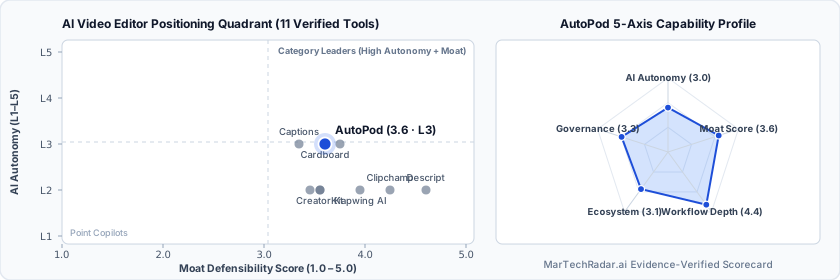
AutoPod is a Web SaaS tool for AI Video Editor (AI Video Repurposing & Shorts Editing) in Visual & Creative Media. Pricing: From $29/mo. Best suited to Creators / Solo. Editor ratings: AI autonomy L3 (conditional automation); moat score 3.6/5.0 (Proprietary moat). Fact-checked by Anthony Hay on Oct 16, 2026.
Adobe Premiere Pro automation plugin suite that algorithmically executes multi-camera switching, social clip creation, and jump cuts from audio waveforms.
AutoPod buyer fit verdict: when to choose vs. when to walk away
Choose AutoPod if (Best Fit)
- Target ICP & Stack Fit: You operate as Creators / Solo requiring a Web SaaS deployment for AI Video Editor.
- L3 Architecture & Defensibility: Deep host-application lock-in via Adobe Premiere Pro panel APIs and local multi-track waveform heuristic algorithms, delivering immediate NLE execution without offloading footage to external cloud infrastructure.
- Commercial Model Fit: Your procurement budget aligns with From $29/mo.
Walk away from AutoPod if (Deal-Breakers)
- Walk away if your workflow requires uncapped enterprise volume on the From $29/mo entry plan without upgrading tiers.
- Walk away if your workflow cannot tolerate crosstalk sensitivity: High ambient noise floor or heavy acoustic bleed between studio microphones disrupts decibel threshold gating, triggering false-positive angle switches during active cross-talk.
- Walk away if nle dependency is a deal-breaker for your team: Architectural coupling exclusively to Adobe Premiere Pro prevents deployment in DaVinci Resolve or Final Cut Pro environments, creating vendor lock-in for editorial pipelines.
AutoPod key facts & scorecard
| Pricing | From $29/moVendor pricing page |
|---|---|
| Free plan | No / not disclosed |
| Delivery | Web SaaS |
| Audience | Creators / Solo |
| AI autonomy level | L3 · Conditional automationEditor-verified |
| Moat tier & score | 3.6 / 5.0 · Proprietary moatEditor-verified |
| Funding | Venture-backed |
| Governance & docs | Privacy ↗ |
| Headquarters | United States |
| Last verified |
AutoPod pros & cons: strengths vs. operational limitations
Pros: core strengths & capabilities
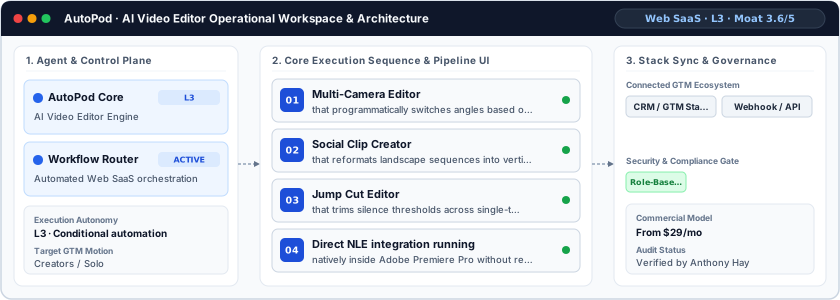
- Multi-Camera Editor: that programmatically switches angles based on individual audio channel decibel spikes and active speakers
- Social Clip Creator: that reformats landscape sequences into vertical social video with automated speaker reframing
- Jump Cut Editor: that trims silence thresholds across single-track and multi-track dialogue clips
- Direct NLE integration running: natively inside Adobe Premiere Pro without requiring external timeline exports
Cons: operational limitations & risks
- Crosstalk Sensitivity: High ambient noise floor or heavy acoustic bleed between studio microphones disrupts decibel threshold gating, triggering false-positive angle switches during active cross-talk.
- NLE Dependency: Architectural coupling exclusively to Adobe Premiere Pro prevents deployment in DaVinci Resolve or Final Cut Pro environments, creating vendor lock-in for editorial pipelines.
- Machine Node Licensing: Node-locked machine activation creates administrative friction when scaling render farms or rotating editors across distributed multi-seat post-production studios.
AutoPod TCO & deal-breaker stress test
Simulate 12-month stepped TCO, hidden cost multipliers, contract lock-in exposure, and stack failure modes using only facts verified by Anthony Hay on · Capture SHA 8d8428cd.
AutoPod aligns with your 5-seat / $800/mo profile. Review the walk-away triggers and contract levers below before deployment.
| Plan / Tier | Verified Rate | Scale Fit | Scope & Quota Notes |
|---|---|---|---|
| Entry / Starter | $29/mo | 1–2 seats | AutoPod Multi-Camera Editor |
- Moat Score
- 3.6 / 5.0
- AI Autonomy
- L3
- Free Tier / Trial
- None disclosed
Triggered audit signals & failure modes
- Published Self-Serve Entry FloorVerified Pricing Ledger
AutoPod publishes a transparent entry point (From $29/mo) for initial validation before committing.
- Primary Operational Bottleneck: NLE DependencyAudit by Anthony Hay
Architectural coupling exclusively to Adobe Premiere Pro prevents deployment in DaVinci Resolve or Final Cut Pro environments, creating vendor lock-in for editorial pipelines.
Hidden TCO Multipliers & Quota Gates
- Crosstalk Sensitivity: High ambient noise floor or heavy acoustic bleed between studio microphones disrupts decibel threshold gating, triggering false-positive angle switches during active cross-talk.
- NLE Dependency: Architectural coupling exclusively to Adobe Premiere Pro prevents deployment in DaVinci Resolve or Final Cut Pro environments, creating vendor lock-in for editorial pipelines.
When to Walk Away & Negotiation Levers
- Walk away if your workflow requires uncapped enterprise volume on the From $29/mo entry plan without upgrading tiers.
- Walk away if your workflow cannot tolerate crosstalk sensitivity: High ambient noise floor or heavy acoustic bleed between studio microphones disrupts decibel threshold gating, triggering false-positive angle switches during active cross-talk.
- Walk away if nle dependency is a deal-breaker for your team: Architectural coupling exclusively to Adobe Premiere Pro prevents deployment in DaVinci Resolve or Final Cut Pro environments, creating vendor lock-in for editorial pipelines.
- Validate exact quota thresholds (seats, credits, or API calls) included in AutoPod's From $29/mo tier before converting from monthly to annual billing.
- Require a sandbox proof-of-concept testing crosstalk sensitivity against your live CRM/data schema before annual sign-off.
Ask a custom procurement or TCO stress-test question about AutoPod
Lower 5-seat floor (~$15/mo vs. From $29 / mo)
Lower 5-seat floor (~$25/mo vs. From $29 / mo)
AutoPod moat & subtrack positioning
Deep host-application lock-in via Adobe Premiere Pro panel APIs and local multi-track waveform heuristic algorithms, delivering immediate NLE execution without offloading footage to external cloud infrastructure.
Editorial review
Fact-checked by Anthony Hay (Senior SEO, Search Intelligence & Content Operations Editor) on .
Background
For post-production houses and podcast networks managing multi-track studio recordings, timeline assembly often bottlenecks delivery schedules. Based in the United States, AutoPod operates as a specialized sequence automation suite built directly into the non-linear editing workspace. Targeting professional video editors and post-production supervisors, the platform eliminates manual cutting across multi-camera setups by transforming raw timeline tracks into finished rough cuts. Rather than forcing editors to move footage out of primary editing applications, AutoPod executes algorithmic timeline cutting directly within the production timeline.
How AutoPod works
AutoPod operates as an Adobe Premiere Pro extension panel utilizing native non-linear editing APIs to automate cut generation. At an L3 conditional autonomy tier, the system ingests multi-track audio feeds directly from timeline sequences. Its Multi-Camera Editor applies digital signal processing to calculate speaker audio peaks, gate thresholds, and voice activity across distinct tracks. Based on user-configured rules—such as speaker priority, shot frequency, and wide-shot intervals—the engine executes frame-accurate razor cuts and camera angle switches. Complementary modules handle silent gap truncation and vertical sequence reframing without offloading media assets to cloud endpoints.
Limitations
Operational considerations and platform boundaries include:
- Crosstalk Sensitivity: High ambient noise floor or heavy acoustic bleed between studio microphones disrupts decibel threshold gating, triggering false-positive angle switches during active cross-talk.
- NLE Dependency: Architectural coupling exclusively to Adobe Premiere Pro prevents deployment in DaVinci Resolve or Final Cut Pro environments, creating vendor lock-in for editorial pipelines.
- Machine Node Licensing: Node-locked machine activation creates administrative friction when scaling render farms or rotating editors across distributed multi-seat post-production studios.
AutoPod pricing
Commercial access to the plugin suite is structured as an individual seat license priced from $29/month. This deployment includes access to the Multi-Camera Editor, Social Clip Creator, and Jump Cut Editor modules. Commercial billing operates on a per-seat, single-workstation activation framework, allowing editors to license single workstations with license-transfer mechanisms for hardware upgrades.
How AutoPod compares
Within the video repurposing domain, AutoPod differs substantially from web-based transcription-first platforms like Descript, Kapwing AI, and Kite. While cloud alternatives ingest compressed source media into hosted ecosystems to generate short clips via automated transcripts, AutoPod maintains all high-bitrate media locally inside the native Adobe NLE. This architecture eliminates multi-gigabyte cloud upload latency and preserves raw codec fidelity. AutoPod suits enterprise post-production studios and high-throughput podcast agencies requiring direct timeline manipulation without altering established non-linear editorial pipelines. It is best suited for enterprise marketing teams and growth practitioners seeking disciplined workflow orchestration.
Frequently asked questions about AutoPod
How much does AutoPod cost and what pricing tiers are available?
Published pricing summary for AutoPod: From $29/mo. A permanent free plan is not disclosed for AutoPod. Commercial access to the plugin suite is structured as an individual seat license priced from $29/month. This deployment includes access to the Multi-Camera Editor, Social Clip Creator, and Jump Cut Editor modules.
How does AutoPod work and how autonomous is its AI architecture?
Adobe Premiere Pro automation plugin suite that algorithmically executes multi-camera switching, social clip creation, and jump cuts from audio waveforms. Within AI Video Editor (AI Video Repurposing & Shorts Editing), MarTechRadar rates its execution architecture at L3 · Conditional automation with a verified Moat Score of 3.6 / 5.0 (Proprietary moat). Deep host-application lock-in via Adobe Premiere Pro panel APIs and local multi-track waveform heuristic algorithms, delivering immediate NLE execution without offloading footage to external cloud infrastructure.
What are the main limitations of AutoPod and when should buyers walk away?
Based on our editorial technical audit, key operational considerations and boundaries for AutoPod include: (1) Crosstalk Sensitivity: High ambient noise floor or heavy acoustic bleed between studio microphones disrupts decibel threshold gating, triggering false-positive angle switches during active cross-talk. (2) NLE Dependency: Architectural coupling exclusively to Adobe Premiere Pro prevents deployment in DaVinci Resolve or Final Cut Pro environments, creating vendor lock-in for editorial pipelines. (3) Machine Node Licensing: Node-locked machine activation creates administrative friction when scaling render farms or rotating editors across distributed multi-seat post-production studios. Primary procurement walk-away rule: Walk away if your workflow requires uncapped enterprise volume on the From $29/mo entry plan without upgrading tiers.
What integrations, compliance certifications, and contract terms apply to AutoPod?
Key TCO multiplier to watch: Crosstalk Sensitivity (High ambient noise floor or heavy acoustic bleed between studio microphones disrupts decibel threshold gating, triggering false-positive angle switches during active cross-talk.) Before signing a contract, procurement teams should validate exact quota thresholds (seats, credits, or API calls) included in AutoPod's From $29/mo tier before converting from monthly to annual billing.
What are the best AutoPod alternatives and head-to-head competitors in 2026?
Top fact-checked alternatives to AutoPod in AI Video Editor (AI Video Repurposing & Shorts Editing) include Captions (Free plan · From $24.99/mo), Clipchamp (Custom / enterprise pricing), Raw Shorts (Custom / enterprise pricing), Opus Clip (Free plan · $15–$29/mo). Within the video repurposing domain, AutoPod differs substantially from web-based transcription-first platforms like Descript, Kapwing AI, and Kite.
Verified sources & evidence trail
- Official product domain: https://autopod.fm
- Commercial pricing verification: https://www.autopod.fm/pricing
- Verified corporate entity profiles (
sameAs): Crunchbase Entity Record - First-party governance & documentation links: Privacy
- Editorial audit sign-off: Fact-checked by Anthony Hay on under the MarTechRadar Evidence-Ledger Protocol.