Opus Clip Review (2026): AI Video Editor Pricing, Limits & Alternatives
Bottom line
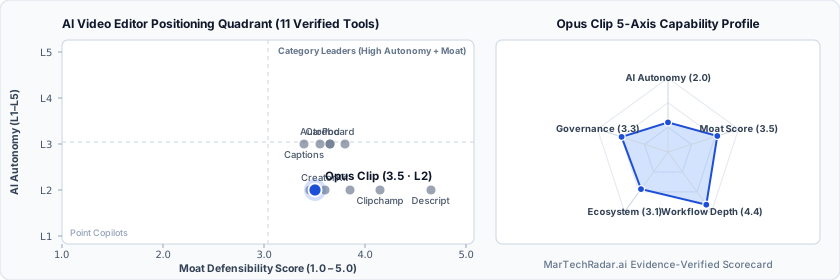
Opus Clip is a Web SaaS tool for AI Video Editor (AI Video Repurposing & Shorts Editing) in Visual & Creative Media. Pricing: Free plan · $15–$29/mo. Best suited to Enterprise Brands. Editor ratings: AI autonomy L2 (workflow copilot); moat score 3.5/5.0 (Proprietary moat). Fact-checked by Anna Xia on Oct 7, 2026.
Multimodal generative AI platform that parses long-form video recordings to extract, reframe, and subtitle short-form vertical video clips.
Opus Clip buyer fit verdict: when to choose vs. when to walk away
Choose Opus Clip if (Best Fit)
- Target ICP & Stack Fit: You operate as Enterprise Brands requiring a Web SaaS deployment for AI Video Editor.
- L2 Architecture & Defensibility: Proprietary virality scoring model coupled with automated multi-speaker facial tracking and automated transcription alignment, purpose-built for high-throughput social video repurposing.
- Commercial Model Fit: Your procurement budget aligns with Free plan · $15–$29/mo and want a self-serve free tier for zero-cost initial validation.
Walk away from Opus Clip if (Deal-Breakers)
- Walk away if your workflow requires uncapped enterprise volume on the Free plan · $15–$29/mo entry plan without upgrading tiers.
- Walk away if your workflow cannot tolerate algorithmic narrative coherence: The heuristic scoring model occasionally extracts sentence fragments when source audio exhibits rapid conversational overlap, requiring manual boundary re-trimming.
- Walk away if dynamic framing occlusion is a deal-breaker for your team: Multi-subject panning scenes can confuse computer vision face detection, resulting in erratic viewport shifting between adjacent speakers during quick exchanges.
Opus Clip key facts & scorecard
| Pricing | Free plan · $15–$29/moVendor pricing page |
|---|---|
| Free plan | Yes |
| Delivery | Web SaaS |
| Audience | Enterprise Brands |
| AI autonomy level | L2 · Workflow copilotEditor-verified |
| Moat tier & score | 3.5 / 5.0 · Proprietary moatEditor-verified |
| Funding | Series A |
| Total funding | Series ABacked by Millennium New Horizons, SoftBank Vision Fund 2, DCM Ventures |
| Company size | 51-200 employees |
| Governance & docs | Trust & Security ↗ · API & Docs ↗ · Terms ↗ · Privacy ↗ |
| Headquarters | Mountain View, California, United States |
| Founded | 2022 |
| Last verified |
Opus Clip pros & cons: strengths vs. operational limitations
Pros: core strengths & capabilities
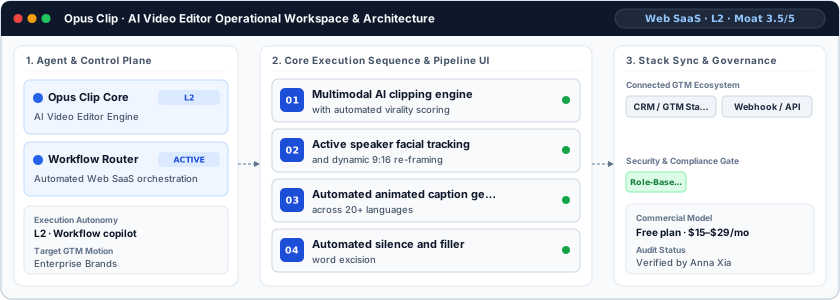
- Multimodal AI clipping engine: with automated virality scoring
- Active speaker facial tracking: and dynamic 9:16 re-framing
- Automated animated caption generation: across 20+ languages
- Automated silence and filler: word excision
Cons: operational limitations & risks
- Algorithmic narrative coherence: The heuristic scoring model occasionally extracts sentence fragments when source audio exhibits rapid conversational overlap, requiring manual boundary re-trimming.
- Dynamic framing occlusion: Multi-subject panning scenes can confuse computer vision face detection, resulting in erratic viewport shifting between adjacent speakers during quick exchanges.
- Rendering credit exhaustion: Processing long-form source footage consumes finite processing minutes quickly, restricting continuous batch rendering on baseline credit allocations.
Opus Clip TCO & deal-breaker stress test
Simulate 12-month stepped TCO, hidden cost multipliers, contract lock-in exposure, and stack failure modes using only facts verified by Anna Xia on · Capture SHA f3534623.
Opus Clip aligns with your 5-seat / $800/mo profile. Review the walk-away triggers and contract levers below before deployment.
| Plan / Tier | Verified Rate | Scale Fit | Scope & Quota Notes |
|---|---|---|---|
| Free / Sandbox | $0 | 1–2 seats (Evaluation) | Entry free tier with capped usage or feature quotas for initial workflow testing. |
| Starter | $15/mo | 1–2 seats | For individual creators |
| Pro | $17.4/mo | 5 seats | For professional creators, marketers, & teams |
| Pro | $29/mo | 15 seats | For professional creators, marketers, & teams |
- Moat Score
- 3.5 / 5.0
- AI Autonomy
- L2
- Free Tier / Trial
- Free plan
Triggered audit signals & failure modes
- Published Self-Serve Entry FloorVerified Pricing Ledger
Opus Clip publishes a transparent entry point (Free plan · $15–$29/mo) with a free tier for initial validation before committing.
- Tier Fit for 5-Seat Scale: Pro ($17.4/mo)Verified Tier Schedule
For professional creators, marketers, & teams
- Primary Operational Bottleneck: Rendering credit exhaustionAudit by Anna Xia
Processing long-form source footage consumes finite processing minutes quickly, restricting continuous batch rendering on baseline credit allocations.
Hidden TCO Multipliers & Quota Gates
- Annual Billing Headline vs. Monthly Premium: Headline entry rates reflect annual billing commitments (Save up to 60%); month-to-month flexibility carries a higher effective monthly rate or requires annual prepayment.
- Credit & Usage Burn Multiplier: Automated workflows consume metered credits/usage quotas; multi-step enrichment, voice minutes, or high-frequency agent runs can trigger mid-cycle top-up packs.
- Enterprise Governance & Add-On Gating: Advanced capabilities such as Single Sign-On (SSO), custom role permissions, or specialized analytics modules are gated behind upper tiers or paid add-ons.
When to Walk Away & Negotiation Levers
- Walk away if your workflow requires uncapped enterprise volume on the Free plan · $15–$29/mo entry plan without upgrading tiers.
- Walk away if your workflow cannot tolerate algorithmic narrative coherence: The heuristic scoring model occasionally extracts sentence fragments when source audio exhibits rapid conversational overlap, requiring manual boundary re-trimming.
- Walk away if dynamic framing occlusion is a deal-breaker for your team: Multi-subject panning scenes can confuse computer vision face detection, resulting in erratic viewport shifting between adjacent speakers during quick exchanges.
- Validate exact quota thresholds (seats, credits, or API calls) included in Opus Clip's Free plan · $15–$29/mo tier before converting from monthly to annual billing.
- Require a sandbox proof-of-concept testing algorithmic narrative coherence against your live CRM/data schema before annual sign-off.
Ask a custom procurement or TCO stress-test question about Opus Clip
Lower 5-seat floor (~$16/mo vs. $17 / mo)
Lower 5-seat floor (~$16/mo vs. $17 / mo)
Opus Clip moat & subtrack positioning
Proprietary virality scoring model coupled with automated multi-speaker facial tracking and automated transcription alignment, purpose-built for high-throughput social video repurposing.
Editorial review
Fact-checked by Anna Xia (Senior B2B GTM & Revenue Systems Analyst) on .
Background
Opus Clip was founded in 2022 in Mountain View, California, to eliminate the manual editing overhead required to transform long-form recordings into short-form assets. Built for video marketing teams, media brands, and growth operators, the platform replaces manual multi-track timeline editing with automated content extraction. Within video repurposing pipelines, the software isolates high-engagement segments from webinars, podcasts, and interviews to generate vertical clips formatted for cross-platform distribution.
How Opus Clip works
The platform processes video via an automated multimodal pipeline that pairs automated speech recognition with facial detection models. Upon ingesting raw video streams via direct upload or external URLs, speech-to-text models transcribe dialogue while computer vision algorithms track speaker presence across individual frames. A semantic parsing layer evaluates narrative coherence and hook density to calculate a proprietary Virality Score. The rendering engine then executes dynamic 9:16 cropping, excises conversational pauses, and overlays synchronized kinetic captions.
Limitations
Operational considerations and platform boundaries include:
- Algorithmic narrative coherence: The heuristic scoring model occasionally extracts sentence fragments when source audio exhibits rapid conversational overlap, requiring manual boundary re-trimming.
- Dynamic framing occlusion: Multi-subject panning scenes can confuse computer vision face detection, resulting in erratic viewport shifting between adjacent speakers during quick exchanges.
- Rendering credit exhaustion: Processing long-form source footage consumes finite processing minutes quickly, restricting continuous batch rendering on baseline credit allocations.
Opus Clip pricing
Opus Clip provides access through a tiered software-as-a-service structure beginning with a Free plan for basic evaluation. Paid tiers commence at the Starter plan priced at $15 per month for 150 processing credits. The Pro plan costs $29 per month on standard monthly billing, with annual commitments reducing the effective rate to $17.4 per month. Licensing tiers govern monthly processing credit caps, brand preset limits, and multi-user workspace seats.
How Opus Clip compares
In contrast to timeline-centric editor Descript, which centers on text-driven document workflows, Opus Clip automates selection logic through predictive scoring. While Kapwing AI and Kite supply broader canvas suites, Opus Clip prioritizes zero-touch 9:16 vertical formatting. Consequently, it fits media production units needing high-velocity social syndication from existing episodic video catalogs rather than full post-production suites.
Direct competitors & market radar
Top algorithmic competitors based on category positioning, capability overlap, and ICP alignment.
Frequently asked questions about Opus Clip
How much does Opus Clip cost and what pricing tiers are available?
Published pricing summary for Opus Clip: Free plan · $15–$29/mo. Opus Clip includes a free tier or sandbox entry point. Verified tier schedule: Free / Sandbox ($0 for 1–2 seats (Evaluation)); Starter ($15/mo for 1–2 seats); Pro ($17.4/mo for 5 seats); Pro ($29/mo for 15 seats). Opus Clip provides access through a tiered software-as-a-service structure beginning with a Free plan for basic evaluation. Paid tiers commence at the Starter plan priced at $15 per month for 150 processing credits.
How does Opus Clip work and how autonomous is its AI architecture?
Multimodal generative AI platform that parses long-form video recordings to extract, reframe, and subtitle short-form vertical video clips. Within AI Video Editor (AI Video Repurposing & Shorts Editing), MarTechRadar rates its execution architecture at L2 · Workflow copilot with a verified Moat Score of 3.5 / 5.0 (Proprietary moat). Proprietary virality scoring model coupled with automated multi-speaker facial tracking and automated transcription alignment, purpose-built for high-throughput social video repurposing. Corporate profile: operating at 51-200 employees scale.
What are the main limitations of Opus Clip and when should buyers walk away?
Based on our editorial technical audit, key operational considerations and boundaries for Opus Clip include: (1) Algorithmic narrative coherence: The heuristic scoring model occasionally extracts sentence fragments when source audio exhibits rapid conversational overlap, requiring manual boundary re-trimming. (2) Dynamic framing occlusion: Multi-subject panning scenes can confuse computer vision face detection, resulting in erratic viewport shifting between adjacent speakers during quick exchanges. (3) Rendering credit exhaustion: Processing long-form source footage consumes finite processing minutes quickly, restricting continuous batch rendering on baseline credit allocations. Primary procurement walk-away rule: Walk away if your workflow requires uncapped enterprise volume on the Free plan · $15–$29/mo entry plan without upgrading tiers.
What integrations, compliance certifications, and contract terms apply to Opus Clip?
First-party governance and developer endpoints verified on domain include: Trust/Security (https://trust.opus.pro), API Docs (https://help.opus.pro/docs/introduction). Key TCO multiplier to watch: Annual Billing Headline vs. Monthly Premium (Headline entry rates reflect annual billing commitments (Save up to 60%); month-to-month flexibility carries a higher effective monthly rate or requires annual prepayment.) Before signing a contract, procurement teams should validate exact quota thresholds (seats, credits, or API calls) included in Opus Clip's Free plan · $15–$29/mo tier before converting from monthly to annual billing.
What are the best Opus Clip alternatives and head-to-head competitors in 2026?
Top fact-checked alternatives to Opus Clip in AI Video Editor (AI Video Repurposing & Shorts Editing) include Descript (Free plan · $16–$65/mo · Enterprise plan), Kapwing AI (Free plan · $16–$50/mo), Captions (Free plan · From $24.99/mo), Clipchamp (Custom / enterprise pricing). In contrast to timeline-centric editor Descript, which centers on text-driven document workflows, Opus Clip automates selection logic through predictive scoring. While Kapwing AI and Kite supply broader canvas suites, Opus Clip prioritizes zero-touch 9:16 vertical formatting.
Verified sources & evidence trail
- Official product domain: https://opus.pro
- Commercial pricing verification: https://www.opus.pro/pricing
- Verified corporate entity profiles (
sameAs): LinkedIn Company Profile - First-party governance & documentation links: Trust & Security · API & Docs · Terms · Privacy
- Editorial audit sign-off: Fact-checked by Anna Xia on under the MarTechRadar Evidence-Ledger Protocol.