Canva Magic Studio Review (2026): AI Product Photography Pricing, Limits & Alternatives
Bottom line
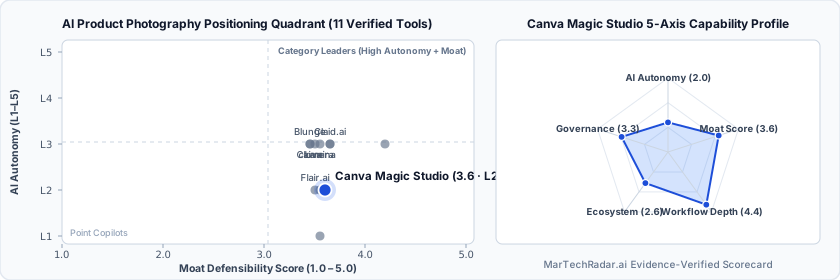
Canva Magic Studio is a Web SaaS tool for AI Product Photography (Product Photography & AI Retouching) in Visual & Creative Media. Pricing: Free plan · $0/mo · Enterprise plan. Best suited to DTC / eCommerce, Enterprise Brands and Creators / Solo. Editor ratings: AI autonomy L2 (workflow copilot); moat score 3.6/5.0 (Proprietary moat). Fact-checked by Jagmeet Sine on Oct 15, 2026.
Suite of generative AI design tools integrated into Canva, offering automated background replacement, generative fill, and visual asset adaptation.
Canva Magic Studio buyer fit verdict: when to choose vs. when to walk away
Choose Canva Magic Studio if (Best Fit)
- Target ICP & Stack Fit: You operate as DTC / eCommerce, Enterprise Brands and Creators / Solo requiring a Web SaaS deployment for AI Product Photography.
- L2 Architecture & Defensibility: Deep distribution within an established collaborative design ecosystem, unified multi-modal editing pipelines, and direct integration between synthetic image generation and vector publishing canvases.
- Commercial Model Fit: Your procurement budget aligns with Free plan · $0/mo · Enterprise plan and want a self-serve free tier for zero-cost initial validation.
Walk away from Canva Magic Studio if (Deal-Breakers)
- Walk away if your workflow requires uncapped enterprise volume on the Free plan · $0/mo · Enterprise plan entry plan without upgrading tiers.
- Walk away if your workflow cannot tolerate high-resolution raster compression: Generative infill and synthesis operations enforce strict pixel-dimension caps, compressing high-resolution commercial photography down to standard web formats during multi-layer compositing.
- Walk away if fine-grained boundary hallucination is a deal-breaker for your team: Automated subject segmentation degrades when processing semi-translucent product surfaces, delicate textures, or intricate shadow gradients, requiring manual mask clean-up.
Canva Magic Studio key facts & scorecard
| Pricing | Free plan · $0/mo · Enterprise planVendor pricing page |
|---|---|
| Free plan | Yes |
| Delivery | Web SaaS |
| Audience | DTC / eCommerce, Enterprise Brands, Creators / Solo |
| AI autonomy level | L2 · Workflow copilotEditor-verified |
| Moat tier & score | 3.6 / 5.0 · Proprietary moatEditor-verified |
| Funding | Venture-backed |
| Governance & docs | Trust & Security ↗ · API & Docs ↗ · Terms ↗ · Privacy ↗ |
| Headquarters | Australia |
| Founded | 2012 |
| Last verified |
Canva Magic Studio pros & cons: strengths vs. operational limitations
Pros: core strengths & capabilities
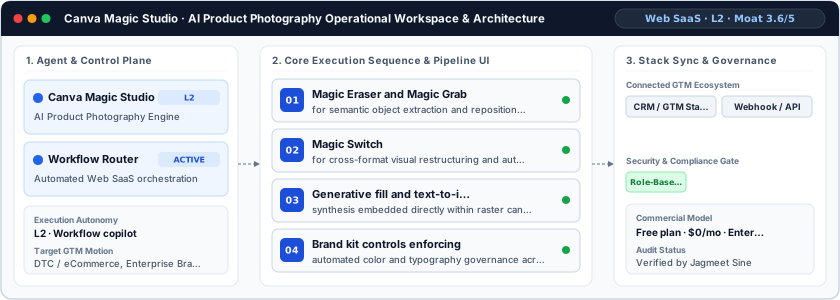
- Magic Eraser and Magic Grab: for semantic object extraction and repositioning
- Magic Switch: for cross-format visual restructuring and automated asset resizing
- Generative fill and text-to-image: synthesis embedded directly within raster canvas workflows
- Brand kit controls enforcing: automated color and typography governance across generated imagery
Cons: operational limitations & risks
- High-Resolution Raster Compression: Generative infill and synthesis operations enforce strict pixel-dimension caps, compressing high-resolution commercial photography down to standard web formats during multi-layer compositing.
- Fine-Grained Boundary Hallucination: Automated subject segmentation degrades when processing semi-translucent product surfaces, delicate textures, or intricate shadow gradients, requiring manual mask clean-up.
- Batch Throughput Latency: Lacking programmatic headless API ingestion for bulk SKU retouching, operations demand manual canvas-by-canvas execution that slows multi-catalog e-commerce pipelines.
Canva Magic Studio TCO & deal-breaker stress test
Simulate 12-month stepped TCO, hidden cost multipliers, contract lock-in exposure, and stack failure modes using only facts verified by Jagmeet Sine on · Capture SHA 67714bdb.
Canva Magic Studio is viable for 5 seats, but requires commercial or technical verification on the flagged items below.
| Plan / Tier | Verified Rate | Scale Fit | Scope & Quota Notes |
|---|---|---|---|
| Free / Sandbox | $0 | 1–2 seats (Evaluation) | Entry free tier with capped usage or feature quotas for initial workflow testing. |
| Enterprise / Custom | Custom quote | 15–50+ seats (Enterprise SLA) | Sales-negotiated annual contract for custom volume, SSO/RBAC governance, and dedicated SLA. |
- Moat Score
- 3.6 / 5.0
- AI Autonomy
- L2
- Free Tier / Trial
- Free plan
Triggered audit signals & failure modes
- Opaque Enterprise Quoting vs. SMB/Mid-Market BudgetVerified Pricing Ledger
Canva Magic Studio does not disclose a public self-serve floor (Free plan · $0/mo · Enterprise plan). Buyers with a $800/mo cap face high sales-qualification friction.
- Published Self-Serve Entry FloorVerified Pricing Ledger
Canva Magic Studio publishes a transparent entry point (Free plan · $0/mo · Enterprise plan) with a free tier for initial validation before committing.
- Primary Operational Bottleneck: High-Resolution Raster CompressionAudit by Jagmeet Sine
Generative infill and synthesis operations enforce strict pixel-dimension caps, compressing high-resolution commercial photography down to standard web formats during multi-layer compositing.
Hidden TCO Multipliers & Quota Gates
- Annual Billing Headline vs. Monthly Premium: Headline entry rates reflect annual billing commitments (Save 16%); month-to-month flexibility carries a higher effective monthly rate or requires annual prepayment.
- Credit & Usage Burn Multiplier: Automated workflows consume metered credits/usage quotas; multi-step enrichment, voice minutes, or high-frequency agent runs can trigger mid-cycle top-up packs.
- Enterprise Governance & Add-On Gating: Advanced capabilities such as Single Sign-On (SSO), custom role permissions, or specialized analytics modules are gated behind upper tiers or paid add-ons.
When to Walk Away & Negotiation Levers
- Walk away if your workflow requires uncapped enterprise volume on the Free plan · $0/mo · Enterprise plan entry plan without upgrading tiers.
- Walk away if your workflow cannot tolerate high-resolution raster compression: Generative infill and synthesis operations enforce strict pixel-dimension caps, compressing high-resolution commercial photography down to standard web formats during multi-layer compositing.
- Walk away if fine-grained boundary hallucination is a deal-breaker for your team: Automated subject segmentation degrades when processing semi-translucent product surfaces, delicate textures, or intricate shadow gradients, requiring manual mask clean-up.
- Validate exact quota thresholds (seats, credits, or API calls) included in Canva Magic Studio's Free plan · $0/mo · Enterprise plan tier before converting from monthly to annual billing.
- Require a sandbox proof-of-concept testing high-resolution raster compression against your live CRM/data schema before annual sign-off.
Ask a custom procurement or TCO stress-test question about Canva Magic Studio
Lower 5-seat floor (~$23/mo vs. Custom Quote)
Lower 5-seat floor (~$120/mo vs. Custom Quote)
Canva Magic Studio moat & subtrack positioning
Deep distribution within an established collaborative design ecosystem, unified multi-modal editing pipelines, and direct integration between synthetic image generation and vector publishing canvases.
Editorial review
Fact-checked by Jagmeet Sine (Senior MarTech Infrastructure & Agentic Workflow Architect) on .
Background
Canva Magic Studio serves digital marketing teams and creative production units tasked with generating high-volume e-commerce and promotional imagery without specialized graphic design software. Headquartered in Australia, Canva consolidated its generative capabilities into this centralized suite to resolve workflow fragmentation between image capture and final asset distribution. Operating under an L2 autonomy model, the system facilitates human-guided creative orchestration, allowing operators to execute complex visual manipulations through conversational prompts and contextual editing widgets directly within active creative documents.
How Canva Magic Studio works
Under the hood, the architecture couples WebGL-accelerated canvas rendering with cloud-hosted diffusion models and multimodal transformation engines. When an operator initiates asset retouching, the system isolates foreground elements via automated semantic edge-detection algorithms, decoupling layers for selective manipulation. The pipeline coordinates inpainting and generative expansion requests through distributed inference endpoints, passing contextual mask coordinates alongside textual directives. Transformations retain layer vector properties, enabling non-destructive compositional adjustments, automated background neutralization, and typography alignment without leaving the primary editor environment.
Limitations
Operational considerations and platform boundaries include:
- High-Resolution Raster Compression: Generative infill and synthesis operations enforce strict pixel-dimension caps, compressing high-resolution commercial photography down to standard web formats during multi-layer compositing.
- Fine-Grained Boundary Hallucination: Automated subject segmentation degrades when processing semi-translucent product surfaces, delicate textures, or intricate shadow gradients, requiring manual mask clean-up.
- Batch Throughput Latency: Lacking programmatic headless API ingestion for bulk SKU retouching, operations demand manual canvas-by-canvas execution that slows multi-catalog e-commerce pipelines.
Canva Magic Studio pricing
Canva Magic Studio utilizes a hybrid commercial model structured around usage allowances. Access begins with a free tier at $0 per month, which grants limited generation credits for core retouching features. Scaled commercial usage requires upgrades to Pro or Enterprise tiers, which provision higher operational compute limits, shared brand control governance, and custom deployment options for corporate design teams.
How Canva Magic Studio compares
Compared to specialized product photography platforms like Blunge, Caimera, and clova, Canva Magic Studio prioritizes broad canvas utility over dedicated automated catalog staging. While Blunge and Caimera deliver specialized photorealistic 3D lighting simulation and clova focuses on high-volume automated SKU retouching, Canva excels in downstream document layout, multi-channel resizing, and collaborative vector integration. The platform remains optimal for distributed marketing teams requiring versatile, non-technical creative assembly rather than dedicated studio-grade batch rendering engines. It is best suited for enterprise marketing teams and growth practitioners seeking disciplined workflow orchestration.
Direct competitors & market radar
Top algorithmic competitors based on category positioning, capability overlap, and ICP alignment.
Frequently asked questions about Canva Magic Studio
How much does Canva Magic Studio cost and what pricing tiers are available?
Published pricing summary for Canva Magic Studio: Free plan · $0/mo · Enterprise plan. Canva Magic Studio includes a free tier or sandbox entry point. Verified tier schedule: Free / Sandbox ($0 for 1–2 seats (Evaluation)); Enterprise / Custom (Custom quote for 15–50+ seats (Enterprise SLA)). Canva Magic Studio utilizes a hybrid commercial model structured around usage allowances. Access begins with a free tier at $0 per month, which grants limited generation credits for core retouching features.
How does Canva Magic Studio work and how autonomous is its AI architecture?
Suite of generative AI design tools integrated into Canva, offering automated background replacement, generative fill, and visual asset adaptation. Within AI Product Photography (Product Photography & AI Retouching), MarTechRadar rates its execution architecture at L2 · Workflow copilot with a verified Moat Score of 3.6 / 5.0 (Proprietary moat). Deep distribution within an established collaborative design ecosystem, unified multi-modal editing pipelines, and direct integration between synthetic image generation and vector publishing canvases.
What are the main limitations of Canva Magic Studio and when should buyers walk away?
Based on our editorial technical audit, key operational considerations and boundaries for Canva Magic Studio include: (1) High-Resolution Raster Compression: Generative infill and synthesis operations enforce strict pixel-dimension caps, compressing high-resolution commercial photography down to standard web formats during multi-layer compositing. (2) Fine-Grained Boundary Hallucination: Automated subject segmentation degrades when processing semi-translucent product surfaces, delicate textures, or intricate shadow gradients, requiring manual mask clean-up. (3) Batch Throughput Latency: Lacking programmatic headless API ingestion for bulk SKU retouching, operations demand manual canvas-by-canvas execution that slows multi-catalog e-commerce pipelines. Primary procurement walk-away rule: Walk away if your workflow requires uncapped enterprise volume on the Free plan · $0/mo · Enterprise plan entry plan without upgrading tiers.
What integrations, compliance certifications, and contract terms apply to Canva Magic Studio?
First-party governance and developer endpoints verified on domain include: Trust/Security (https://www.canva.com/trust/legal), API Docs (https://www.canva.com/docs). Key TCO multiplier to watch: Annual Billing Headline vs. Monthly Premium (Headline entry rates reflect annual billing commitments (Save 16%); month-to-month flexibility carries a higher effective monthly rate or requires annual prepayment.) Before signing a contract, procurement teams should validate exact quota thresholds (seats, credits, or API calls) included in Canva Magic Studio's Free plan · $0/mo · Enterprise plan tier before converting from monthly to annual billing.
What are the best Canva Magic Studio alternatives and head-to-head competitors in 2026?
Top fact-checked alternatives to Canva Magic Studio in AI Product Photography (Product Photography & AI Retouching) include HelloCreator (Custom / enterprise pricing), Moda (Custom / enterprise pricing), Magic Studio (Free plan · $0/mo · Enterprise plan), clova ($23–$95/mo). Compared to specialized product photography platforms like Blunge, Caimera, and clova, Canva Magic Studio prioritizes broad canvas utility over dedicated automated catalog staging.
Verified sources & evidence trail
- Official product domain: https://canva.com/magic
- Commercial pricing verification: https://www.canva.com/pricing/
- First-party governance & documentation links: Trust & Security · API & Docs · Terms · Privacy
- Editorial audit sign-off: Fact-checked by Jagmeet Sine on under the MarTechRadar Evidence-Ledger Protocol.